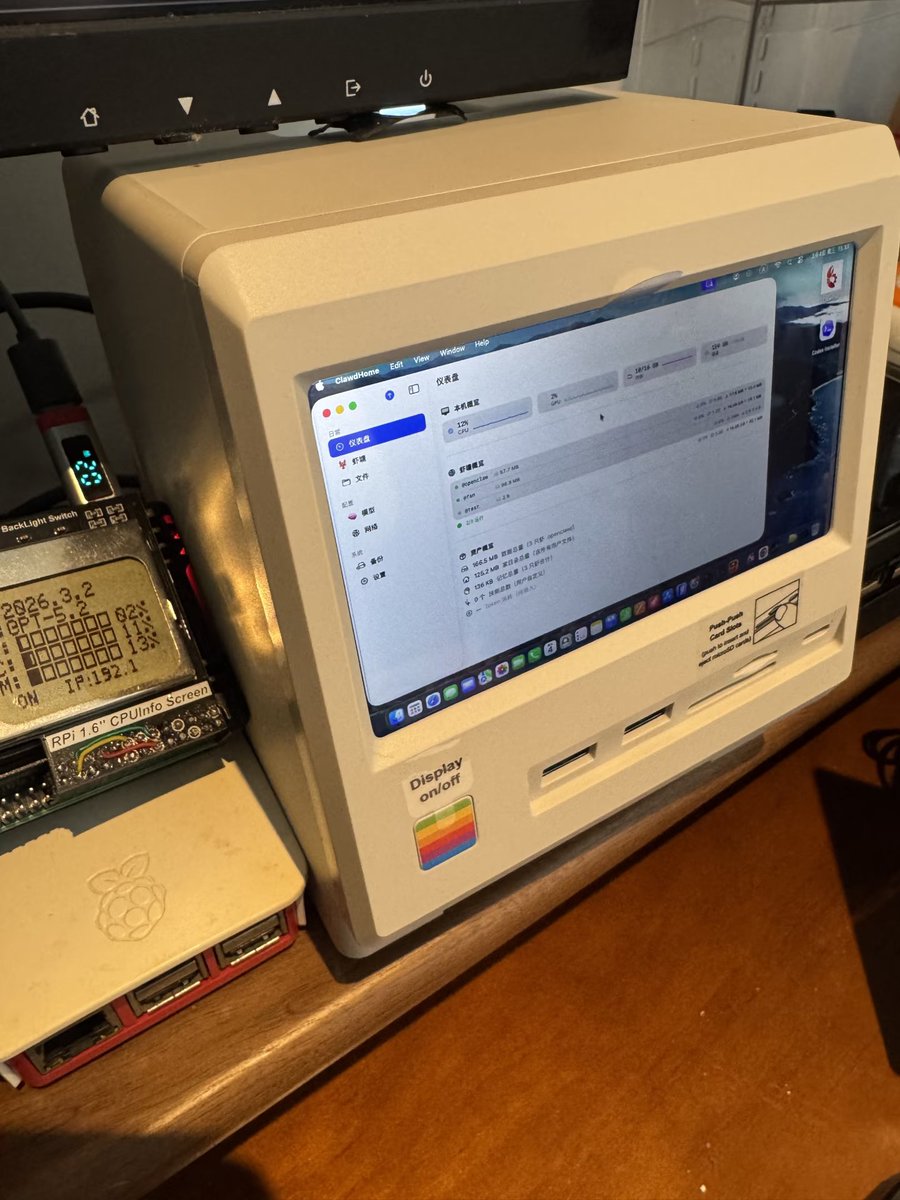
Nice! I recently got a base model Mac mini and paired it with that retro docking station, and it feels amazing! I couldn't resist showing it off.
My 16GB + 256GB base model Mac mini is now a lobster farming base.
Running it 24/7 with low power consumption, raising some lobsters (running small models and automated tasks), the cost-effectiveness is off the charts.
Paired with the Wokyis M5 docking station, which looks like a Macintosh, both aesthetics and functionality are on point. My 256GB storage anxiety is solved, and my desktop looks better too.
About how to use the Mac mini for lobster farming:
· Low-cost isolation: macOS's native multi-user isolation is even lighter than Docker, making 16GB of RAM feel like 32GB. Combined with ClawdHome, it allows the whole family to safely run OpenClaw lobster farming on this little box, and I've raised several different levels of lobsters myself.
• Visual Interaction: The Wokyis M5's secondary screen perfectly solves the awkwardness of the Mac mini's "headless" design, allowing you to easily check what your Mac is doing, and even monitor the shrimp on your Raspberry Pi.
• Low Power Consumption King: A 24/7 uninterrupted home AI hub, coupled with the OpenClaw ecosystem, it's a godsend for developers and tinkerers.
• Local Model Enhancement: Recently, I've been using the Qwen 3.5 small model and local TTS, running small models on the Apple MLX architecture for manual tasks, prioritizing privacy – it's fantastic.
Let's talk about this docking station (Wokyis M5):
I initially thought it was just a retro decorative piece, but its functionality is surprisingly impressive:
• 5-inch High-Definition Monitor: Not only does it serve as a secondary screen for my Mac to check the clock, but I also connect it to my Raspberry Pi to monitor my Mac in real-time while running browser automations – this perspective is inexplicably stress-relieving.
* **Physical Buttons for a Superb Experience:** Physical buttons for screen power and brightness adjustment provide excellent tactile feedback, much more comfortable than a touch bar.
* **Built-in M.2 SSD Bay:** Supports up to 8TB of expansion, relieving 256GB users' storage anxiety. Whether storing data for everyday tasks or using it as a home backup hub, it's all there.
* **Full Range of Ports:** Four USB-A ports + one USB-C port (all 10Gbps), plus dual SD/TF 4.0 card reading. Photographers no longer need to blindly plug and unplug files from the back of the device.
* **Cooling and Quiet Operation:** The exposed bottom section, while slightly less aesthetically pleasing, aids in heat dissipation; the M4 truly stays cool.
It's amazing! Perfect for those who love tinkering and having fun.